My BASIC code of ethics

I started programming on my Commodore VIC-20, then moved up to the C64 & Apple ][, all the while programming in BASIC.
All of these versions of BASIC are based off of the Microsoft BASIC that came before. BASIC has been called a “bowl of spaghetti” programming language, because of how unstructured it is. Back in the day I wrote sloppy code; putting multiple commands on a line until it wrapped, using a ? instead of print, goto statements all over the place & not a REMark in sight.
Now, after 40+ years of doing NO programming & want to start again, with a clean slate. I’m still going to use my Apple][ BASIC, but I’m going to do it better. I want anyone who has one of my programs to understand it & be able to modify it easily.
Here is my pledge.
- don’t put multiple commands on one line except for IF/THEN, vars or REMarks
- use full variable names for clarity (UN is the same as UNknown)
- use GOTO/GOSUB statements for IF/THEN loops
- don’t cram items together: e.g. x=(c+(v*5)/3 -vs- x= (c+ (v*5) /3
- use plenty of REMarks (see remarks below)
- use subroutines, not a bunch of GOTOs
- NEVER have a goto or gosub point to a REMark
- always use a REMark statement on a gosub/goto, so you know where it is going
- put a clear variable list at the bottom in REMark statements
- all REMark statements should be able to be deleted without affecting the program
Line numbering rules

- step by 5 or 10
- lines 1 – 49 are for REMarks giving info about the program

- lines 50 – 1,999 are for the main program code (That is 389 lines available, by 5’s)
- lines 2,000 – 19,999 are for the program subroutines (3,599 lines available, by 5’s)
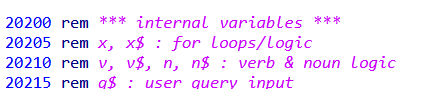
- lines 20,000 – 25,000 is the variable list/instruction REMarks (1,000) lines available, by 5’s)
REMark statement rules

major program segments
- rem
- rem *** [start line]-[last line] description ***
- rem
used to denote the main parts of the program
secondary segments
- rem
- rem ** description **
used for various sub-parts of the major program segments
jump segments
- rem * description *
- a description of where the program is going
- to be put at the end of a goto/gosub statement
- e.g. gosub 1000 : rem * set up variables *
instructional items
- rem — description
- gives information about a particular part of the program
- can be put at the end of a statement
extra space for code
- rem /////[start line]-[last line] open
variable list rules
- start the list with the header
- 19996 end
- 19997 rem ***********************************
- 19998 rem *** 20,000-25,000 variable list ***
- 19999 rem ***********************************
- then group your variables by type if needed
- rem *** variable type ***
- rem variables
- rem more variables…

- use 1 variable per line
- write out the entire variable name with the first two letters capitalized
- separate the different group types with a space
- the last group should show the “internal” variables used